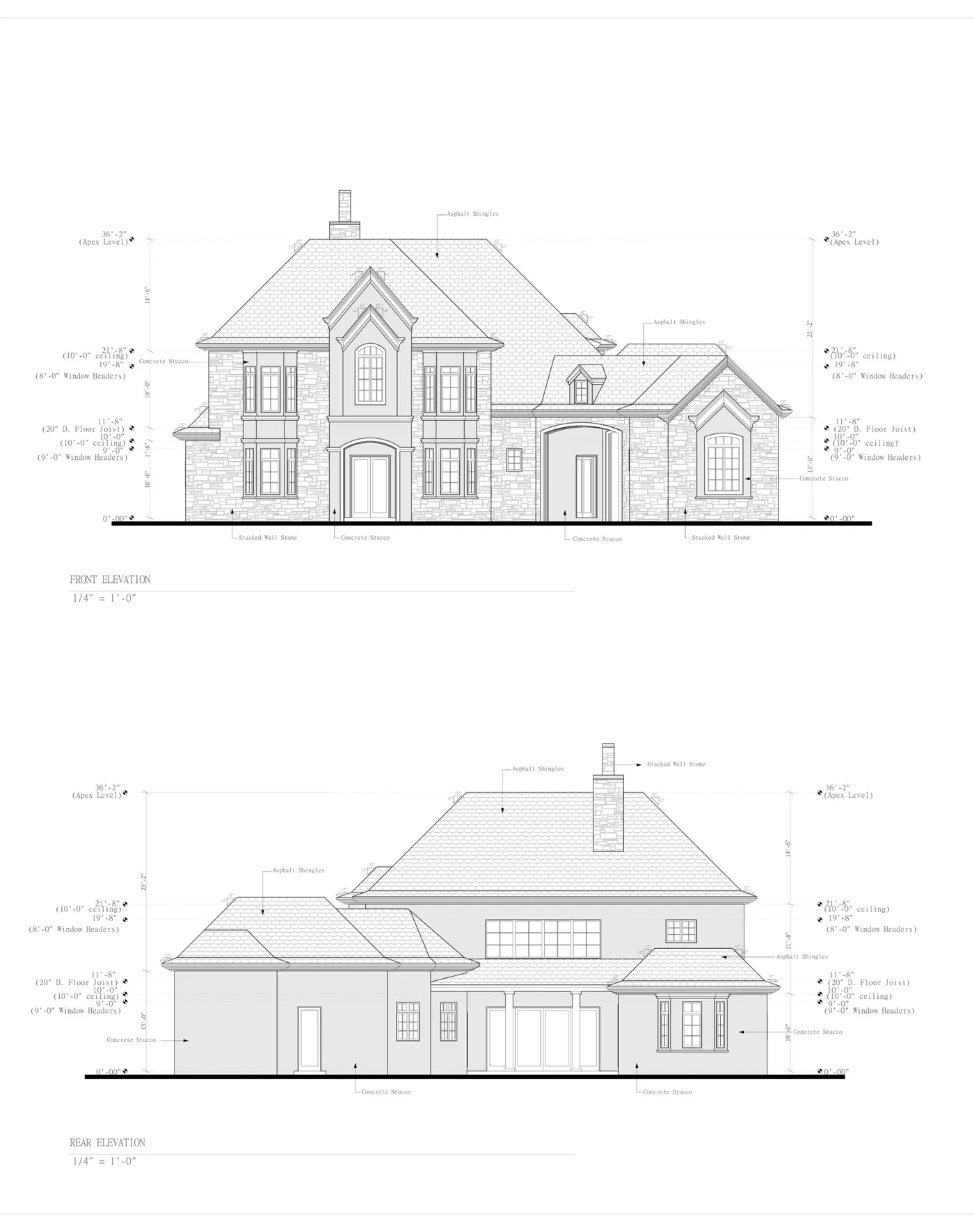
For more than four decades, Autodesk AutoCAD has served as the universal language of the architecture, engineering, and construction (AEC) industries. Even with the emergence of complex 3D Building Information Modeling (BIM) platforms, 2D AutoCAD drafting remains the dominant, battle-tested standard for producing residential permit sets, commercial tenant improvements, framing details, and shop drawings.
However, running an in-house drafting department has become increasingly burdensome for general contractors, remodelers, and boutique architectural firms. Between entry-level drafter salaries averaging $65,000 to $85,000 annually, expensive commercial Autodesk subscription licensing, specialized hardware workstations, and employee turnover, maintaining drafting capacity in-house creates massive overhead.
When project volume surges, builders face a difficult dilemma: turn away lucrative construction jobs or spend weeks recruiting, onboarding, and managing internal drafting personnel.
Professional AutoCAD drafting services provide a flexible, scalable alternative. By outsourcing your technical production drafting to specialized CAD technicians, you convert a heavy fixed payroll expense into a predictable, variable project cost.
This guide provides a comprehensive overview of commercial auto cad drafting services in 2026. We examine industry drafting standards, AIA layer conventions, file deliverables, realistic market pricing models, and how to successfully integrate external CAD drafting into your construction workflow.
What Are AutoCAD Drafting Services?
AutoCAD drafting services encompass technical drawing production performed by certified computer-aided design drafters using Autodesk AutoCAD software. These services translate conceptual sketches, scanned paper blueprints, point-cloud laser measurements, or designer redlines into pristine, dimensionally accurate 2D vector CAD files (DWG format) and standardized architectural PDF permit sets.
Rather than providing creative architectural design from scratch, an auto cad drafting service acts as your virtual production studio. You provide the project parameters, rough dimensions, engineering specifications, or field measurements, and the drafting team handles the labor-intensive task of generating clean, code-compliant construction documents.
Key Applications Across the Building Industry
Professional auto cad drafting services support a wide variety of project types:
- Residential Permit Sets: Complete architectural drawings for custom homes, accessory dwelling units (ADUs), home additions, garage conversions, and interior structural remodels.
- Commercial Tenant Improvements (TI): Retail space build-outs, office interior partitions, accessibility (ADA) compliance updates, and exit-egress path plans.
- As-Built Documentation: Converting field measurements, 3D Matterport scans, or hand sketches of existing buildings into accurate CAD floor plans, exterior elevations, and building sections.
- Paper-to-CAD Conversions: Digitizing archived hand-drawn vellum or blue-line drawings into fully editable, layered DWG files.
- Shop Drawings and Subcontractor Details: Detailed fabrication drawings for steel fabricators, custom cabinetry millwork, glass storefronts, and MEP (mechanical, electrical, plumbing) contractors.
- Redline CAD Revisions: Updating existing drawing sets to incorporate field change orders, building department plan check corrections, or owner-directed finish adjustments.
+--------------------------------------------------------------------------+
|                    THE AUTOCAD DRAFTING PRODUCTION ENGINE                |
+--------------------------------------------------------------------------+
|                                                                          |
|  [ INPUT DATA ]                                                          |
|  * Field laser measurements or Matterport scans                          |
|  * Conceptual hand sketches & floor plan layouts                         |
|  * Structural engineering calculations & beam callouts                   |
|  * City plan check correction notice redlines                            |
|                                                                          |
|                           |                                              |
|                           v                                              |
|                                                                          |
|  [ AUTOCAD PRODUCTION STUDIO ]                                           |
|  * National CAD Standard (NCS) & AIA Layer Management                    |
|  * Dynamic blocks, annotative text, and precision dimension strings      |
|  * Paper Space sheet layouts (Arch D 24x36 / Arch C 18x24)               |
|  * Cross-referencing schedules (Doors, Windows, Finishes)                |
|                                                                          |
|                           |                                              |
|                           v                                              |
|                                                                          |
|  [ DELIVERABLE ASSETS ]                                                  |
|  * Native, uncorrupted .DWG files (Version compatible)                   |
|  * Layered, high-resolution vector .PDF permit submittal sets            |
|  * Standardized Plot Style Tables (.CTB files)                           |
|                                                                          |
+--------------------------------------------------------------------------+
4 Industry Pricing Models for AutoCAD Drafting
When evaluating an auto cad drafting company, understanding how drafting fees are structured helps you choose the model that protects your project margins:
| Pricing Model | Typical 2026 Rate Range | Best Suited For | Key Risks / Considerations |
|---|---|---|---|
| Hourly Freelance Rate | $45 - $95 / hour (US domestic) $25 - $45 / hour (Offshore) |
Minor redlines, quick sheet updates, or undefined troubleshooting. | No budget ceiling; slow drafters can inflate your final bill unexpectedly. |
| Per-Sheet Flat Fee | $150 - $400 / sheet (24x36 Arch D) | Standardized commercial drafting or repetitive tenant improvements. | Disputes over what constitutes a "full sheet" vs "detail sheet." |
| Percentage of Construction | 3% - 8% of build budget | Full-service traditional architectural design studios. | Exorbitant for additions or drafting-only production work. |
| Flat Per-Square-Foot Rate (ArchWorkPro) | $1.00 per square foot ($1,200 project minimum) |
Residential additions, ADUs, custom homes, and commercial TIs. | Complete budget predictability; you know the exact cost before drafting begins. |
1. The Hourly Rate Trap
Many independent CAD drafters bill hourly. While hourly billing works well for small two-hour redline fixes, it introduces severe budget volatility on complete permit sets:
- If an hourly drafter takes 40 hours to complete a 500-square-foot addition set at $75 per hour, your drafting bill climbs to $3,000.
- If the drafter encounters unexpected code nuances or works inefficiently, you bear 100 percent of the financial risk.
2. The Traditional Architect Percentage Markup
Hiring a traditional architect to generate CAD drawings typically results in fees pegged to a percentage of your estimated construction cost:
- On a $150,000 home addition or detached garage conversion, an architect charging 8 percent will bill you $12,000 for drawings.
- If you already know what you want to build and simply need code-compliant technical CAD drawings, paying percentage retainers wastes thousands of dollars in capital.
3. The Flat Per-Square-Foot Advantage (ArchWorkPro)
At ArchWorkPro, we believe that technical production drafting should be simple, transparent, and completely predictable:
- We charge an honest flat rate of $1 per square foot for architectural drafting (subject to a clear $1,200 project minimum).
- For an 800-square-foot accessory dwelling unit or commercial remodel, you pay $1,200 to $1,500 for a complete, permit-ready 2D CAD plan set.
- You know your exact drawing cost before our team draws the first line, allowing you to incorporate drafting fees into your construction bids with zero margin guesswork.
To review our complete pricing schedule across residential and commercial drafting, visit our architectural drafting pricing guide.
Technical CAD Standards: Why AIA Layering Matters
The single biggest difference between amateur drafting and professional auto cad drafting services is adherence to standardized file architecture.
If a drafter dumps all drawing elements onto "Layer 0," draws with continuous white lines, and fails to use external references (Xrefs) or paper space layouts, that file becomes an unmanageable mess. Structural engineers, civil engineers, and Title 24 energy consultants cannot manipulate the file without spending hours cleaning up corrupted geometry.
Professional CAD services strictly adhere to the United States National CAD Standard (NCS) and the American Institute of Architects (AIA) CAD Layer Guidelines.
+--------------------------------------------------------------------------+
|                     STANDARD AIA CAD LAYERING MATRIX                     |
+--------------------------------------------------------------------------+
|                                                                          |
|  Layer Name          Color Code     Lineweight     Content Description   |
|  ----------------------------------------------------------------------- |
|  A-WALL-FULL         Color 1 (Red)  0.50 mm        Full-height walls     |
|  A-WALL-PRHT         Color 2 (Yel)  0.35 mm        Partial-height walls  |
|  A-DOOR              Color 3 (Grn)  0.25 mm        Door swings & leaves  |
|  A-GLAZ              Color 4 (Cyan) 0.25 mm        Windows & curtainwall |
|  A-FLOR-FIXT         Color 5 (Blue) 0.18 mm        Plumbing fixtures     |
|  A-FLOR-CASE         Color 6 (Mag)  0.18 mm        Cabinetry & casework  |
|  A-ANNO-DIMS         Color 7 (Wht)  0.18 mm        Dimension strings     |
|  A-ANNO-TEXT         Color 7 (Wht)  0.25 mm        Room labels & notes   |
|  S-COLS-BEAM         Color 1 (Red)  0.50 mm        Structural beams/posts|
|                                                                          |
+--------------------------------------------------------------------------+
1. Hierarchy of Lineweights
In architectural drafting, lineweight conveys depth, hierarchy, and structural importance:
- Heavy Lineweights (0.50 mm to 0.70 mm): Structural elements cut in cross-section, such as exterior concrete footings, load-bearing exterior walls, and primary structural headers.
- Medium Lineweights (0.35 mm to 0.40 mm): Interior non-bearing partition walls, door frames, and major built-in cabinetry.
- Fine Lineweights (0.18 mm to 0.25 mm): Surface hatches, dimension lines, gridlines, door swing arcs, and floor tile patterns.
When drawings follow strict color-dependent plot style tables (.CTB files), every sheet plots crisply, eliminating the muddy, illegible lines that cause city plan checkers to issue correction notices.
2. Model Space vs. Paper Space Discipline
Amateur drafters often draw sheet borders and title blocks directly in Model Space at full scale, or scale down building geometry to fit a sheet.
- Model Space: Contains exclusively full-scale, 1:1 real-world geometry. A 20-foot wall is drawn exactly 20 feet long.
- Paper Space (Layout Tabs): Contains the sheet border, title block, project information, and scaled viewports (e.g., 1/4 inch = 1 foot for floor plans, 1/2 inch = 1 foot for assembly details). Annotative text and dimensions automatically adjust scale between different viewports, ensuring flawless presentation.
3. External References (Xrefs) Management
On multi-sheet plan sets, using external references ensures that any change to the master architectural floor plan automatically updates across electrical plans, roof framing plans, and foundation layouts. Professional CAD studios maintain clean, relative file paths so that files open cleanly on any computer without missing link errors.
What Deliverables Should You Expect from a CAD Studio?
When you hire an auto cad drafting company, your agreement should explicitly detail the final file deliverables. Receiving a flattened PDF without the underlying source files leaves you stranded if you need future field revisions or engineering integration.
A complete professional deliverable package includes:
- Native Autodesk DWG Files: Unlocked, non-corrupted vector CAD source files saved in a widely compatible format (typically AutoCAD 2018 or newer DWG format). All layers, blocks, and Xrefs must be cleanly bound or packaged using Autodesk eTransmit.
- Standardized Plot Style Files (.CTB): The exact color-dependent plot style table used by the drafting team, ensuring you can plot the files in your own office with identical lineweights and screening percentages.
- High-Resolution Vector PDF Plan Sets: Multi-page PDF sets generated at full architectural sheet scale (typically Arch D 24x36 inches for residential/commercial projects, or Arch C 18x24 inches for smaller remodels). Vector PDFs allow plan checkers to zoom in on microscopic details without pixelation.
- Custom Font and Linetype Files: Any non-standard true-type fonts (.TTF) or custom linetypes (such as dashed property lines or utility easements) embedded in the project folder.
To understand how file formats impact your project delivery and subcontractor handoffs, read our technical guide on DWG, PDF, and Revit file formats.
5 Business Benefits of Outsourcing AutoCAD Drafting
For general contractors, residential designers, and trade subcontractors, outsourcing CAD production provides substantial operational advantages:
+--------------------------------------------------------------------------+
|               IN-HOUSE DRAFTING VS. OUTSOURCED PRODUCTION                |
+--------------------------------------------------------------------------+
|                                                                          |
|  IN-HOUSE DRAFTER                        OUTSOURCED CAD STUDIO           |
|  * $75,000 base salary                   * $1.00 per square foot         |
|  * $15,000 benefits & taxes              * Zero benefits or payroll tax  |
|  * $2,500 annual software license        * Zero software overhead        |
|  * $4,000 CAD workstation computer       * Zero hardware costs           |
|  * Paid during slow winter seasons       * Billed only when you have jobs|
|  * Production bottleneck during surges   * Infinite scalable capacity    |
|                                                                          |
|  TOTAL: ~$96,500 fixed annual cost       TOTAL: Scalable variable expense|
+--------------------------------------------------------------------------+
1. Eliminating Fixed Payroll Overhead
Carrying a full-time in-house drafter costs between $85,000 and $105,000 annually when factoring in payroll taxes, health benefits, workers' compensation insurance, paid time off, and Autodesk commercial licenses.
During slow building months (such as winter in northern states), you still must pay that salary. By partnering with an external drafting service, your drafting expenses track your revenue: when you have projects, you pay for drafting; when work slows down, your overhead drops to zero.
2. Eliminating Software and Hardware Capital Expenditures
Autodesk commercial licenses cost thousands of dollars per seat annually. In addition, professional 2D CAD production requires high-performance desktop computers equipped with multi-core processors, dedicated graphics cards, and dual 4K monitors. Outsourcing completely removes hardware replacement cycles and software subscription renewals from your balance sheet.
3. Rapid Turnaround and Capacity Elasticity
In-house teams have a hard ceiling: one drafter can only generate a certain number of sheets per week. When three clients sign contracts in the same week, an in-house drafter creates a massive production bottleneck that delays permit submittals.
A dedicated auto cad drafting service operates with multi-seat capacity. You can submit three custom home plans and two tenant improvement projects simultaneously and receive complete drafts within business days, keeping your job pipeline flowing smoothly.
4. Letting Contractors Focus on Revenue-Generating Activities
General contractors generate revenue by managing job sites, bidding projects, negotiating with subcontractors, and closing client sales. Spending 25 hours a week hunched over a laptop moving CAD lines is an inefficient use of a contractor's time.
Outsourcing production drafting frees you to be on-site, managing trades, ensuring quality control, and securing new contracts.
5. Access to Specialized Drawing Expertise
A skilled CAD technician drafts plans every single day. They know the subtle nuances of IRC egress requirements, Title 24 energy schedules, standard kitchen counter clearances, and municipal plan check submission conventions. Their specialized production speed produces cleaner, more professional drawings in half the time it takes a generalist builder.
To explore how construction firms scale their businesses with outsourced drafting, read our in-depth analysis of outsourced drafting services for contractors.
How to Work Effectively with an AutoCAD Drafting Service
To achieve the best results from an external auto cad drafting service, establish a clear, structured intake process:
1. Provide Clear Baseline Input Documents
The quality of your CAD output depends directly on the quality of your input data:
- Provide dimensioned field sketches or laser measurements showing existing wall locations, ceiling heights, and window/door openings.
- Include photographs of the job site, existing electrical service panels, and exterior elevations.
- Attach any preliminary structural engineering markups or beam sizing notes.
2. Establish a Standardized Scope Checklist
Do not simply tell a drafter to "draw an addition." Provide a written scope checklist detailing:
- Exact room names and intended functions.
- Desired ceiling heights (e.g., 9-foot flat ceilings vs. vaulted ceilings with scissor trusses).
- Window and door specifications (e.g., sliding vinyl windows vs. out-swinging French patio doors).
- Exterior finish materials (e.g., three-coat stucco, fiber cement siding, or board-and-batten).
3. Implement a Two-Round Redline Review Process
A structured review protocol prevents endless revision cycles:
- Round 1 (Preliminary Architectural Draft): Review overall room dimensions, door swings, window sizes, and exterior rooflines. Mark up adjustments using PDF redline tools (such as Bluebeam Revu or Adobe Acrobat).
- Round 2 (Final Sheet Review): Check electrical outlet spacing, note callouts, dimension strings, and Title 24 energy schedules before compiling the final submittal set.
+--------------------------------------------------------------------------+
|                  THE 3-TIER CLIENT DRAFTING WORKFLOW                     |
+--------------------------------------------------------------------------+
|                                                                          |
|  Phase 1: Project Intake & Dimensional Verification                      |
|           Client submits sketches, measurements & scope requirements.    |
|                                                                          |
|  Phase 2: Preliminary CAD Generation (Turnaround: 3 to 5 Days)           |
|           Drafter builds 1:1 Model Space geometry and initial sheets.    |
|                                                                          |
|  Phase 3: Client Redline Review & Final Permit Assembly                  |
|           Drafter incorporates feedback; delivers vector PDF & DWG files.|
|                                                                          |
+--------------------------------------------------------------------------+
Why Choose ArchWorkPro for Your AutoCAD Drafting Services?
Whether you are a licensed general contractor balancing five active job sites, a boutique architect needing overflow production capacity, or a homeowner preparing permit plans, ArchWorkPro delivers industry-leading CAD drafting services designed for speed, precision, and value:
- Transparent $1/Sq Ft Pricing: We eliminate confusing hourly bills and expensive percentage retainers. Our residential and commercial drafting services cost an honest, flat rate of $1 per square foot (subject to a $1,200 project minimum).
- Rapid Production Turnaround: While traditional architectural studios take months to deliver drawings, our dedicated CAD technicians complete full preliminary plan sets in business days.
- National Building Code Expertise: We draft to international, state, and local residential and commercial codes across all 50 states, ensuring your plans incorporate the required egress, structural, and energy compliance standards.
- Full Drawing Ownership: You receive pristine, high-resolution vector PDF permit sets and fully unlocked, native Autodesk DWG files adhering to AIA CAD Layer Guidelines. You own your drawings completely.
- We Draft, You Run Your Project: We provide the technical drawing foundation that turns design concepts into buildable construction sets, allowing you to manage your project with confidence and control your bottom line.
If you are ready to streamline your drafting production, scale your construction business, and eliminate payroll overhead, explore our complete architectural drafting services, learn more about our national drafting firm, or get started with our drafting team today.
Frequently Asked Questions About AutoCAD Drafting Services
What software versions do AutoCAD drafting services support?
Most professional drafting services maintain current Autodesk subscriptions and can deliver DWG files compatible with AutoCAD 2018 through 2026. If you or your consulting engineers use older legacy CAD software, files can easily be saved backward to AutoCAD 2013, 2010, or 2004 DWG formats to ensure seamless compatibility without data loss.
Can AutoCAD drafting services convert paper blueprints or PDF files into DWG?
Yes. Paper-to-CAD and PDF-to-CAD conversions are standard drafting services. Rather than using automated raster-to-vector tracing software (which often creates inaccurate, misaligned geometry), professional drafters manually redraw the floor plans, elevations, and details using exact dimensional measurements, resulting in pristine, clean CAD layers.
What is the difference between AutoCAD drafting and Revit BIM modeling?
AutoCAD is primarily a precision 2D computer-aided drafting platform that creates vector lines, arcs, circles, and text representations of buildings. Autodesk Revit is a 3D Building Information Modeling (BIM) platform where buildings are constructed virtually using smart parametric objects (such as walls with embedded thermal data, window assemblies, and ductwork). For standard residential building permits, additions, and commercial tenant improvements, 2D AutoCAD drafting is significantly faster, more cost-effective, and universally supported by local building departments.
Do outsourced AutoCAD drafting services include structural engineering stamps?
Standard architectural CAD drafting services produce the complete architectural, spatial, and electrical drawing set. If your municipal building department requires structural engineering calculations (such as stamped shear wall schedules or foundation rebar sizing), those calculations must be performed and stamped by an independently licensed Professional Engineer (PE) or Registered Architect (RA) licensed in your project's state. Drafters work directly with your structural engineer to incorporate their structural markups onto Sheets S-1 and S-2.
How do I submit my project dimensions to get started?
To start an AutoCAD drafting project, you can upload hand-drawn sketches with clear dimensions, scanned blueprint copies, architectural concept markups, or matterport 3D scans. You can also provide job site photos and your property parcel survey map. Our drafting team will review the input data, verify dimensional consistency, and begin drafting your project immediately.